
How AI works · for your AI
How AI works
---
id: what-ai-is
title: How AI works
topic: landscape
level: 1
builds-on: []
modes: [day-pack, rucksack]
moment: "they ask what the AI is or whether it is a person, ask how it knows something, or get a wrong answer and ask why"
keywords: [AI app, model, language model, LLM, token, piece, likeliest next piece, search, sources, confident answer, GPT-6, Claude Opus 5.5]
related: [how-a-chat-starts, connectors-and-permissions]
checked: 2026-10-18
---
What it is
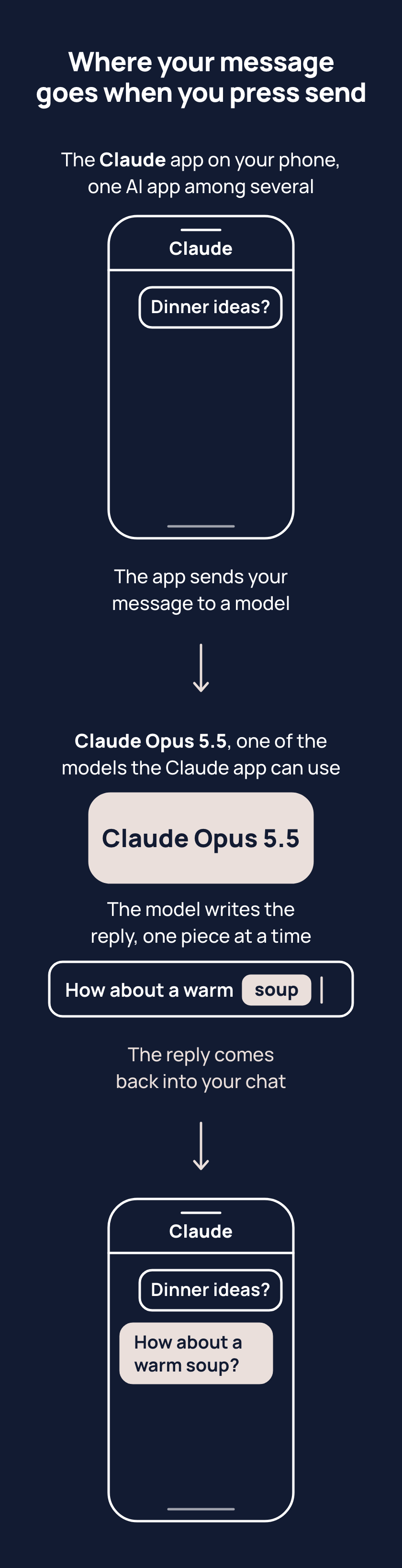
ChatGPT, Claude, Gemini and Copilot are AI apps: what you open and type into. The app does not write the reply. It sends your message to a separate program, called a model, which writes the reply. The model runs on computers elsewhere, not on your phone. ChatGPT uses a model called GPT-6, and the Claude app can use one called Claude Opus 5.5.
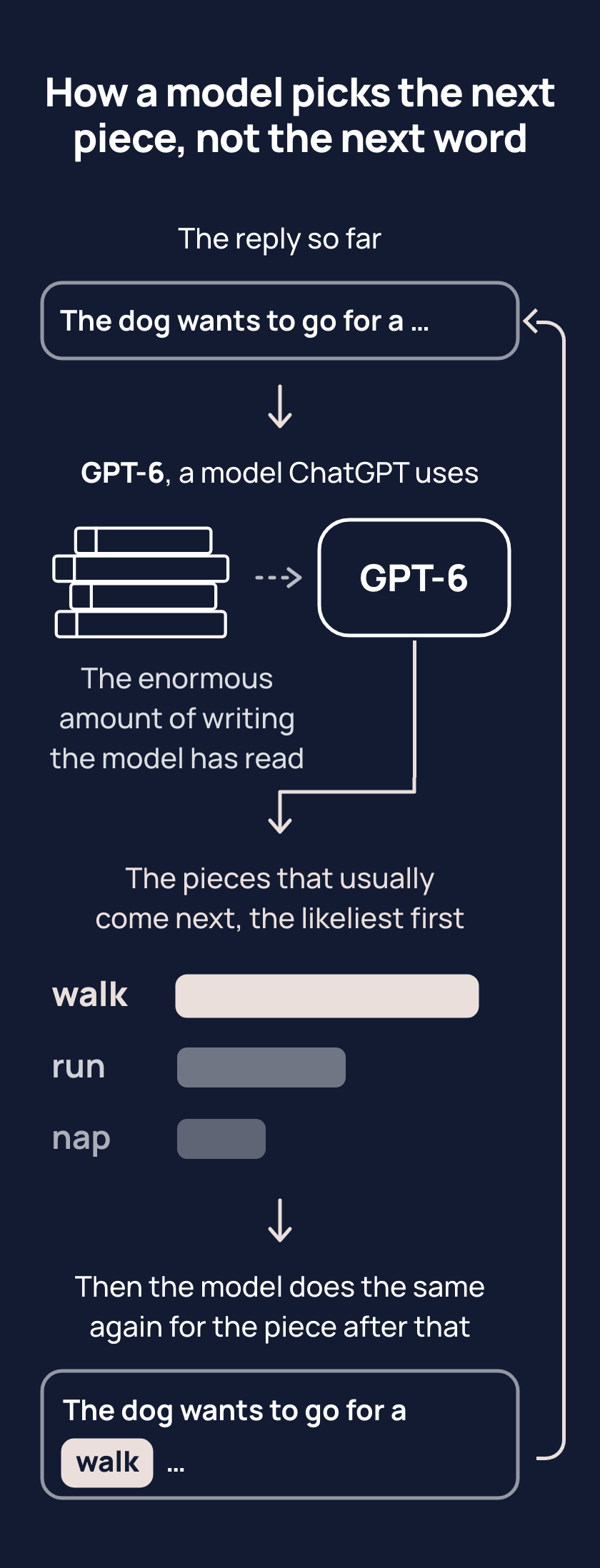
Before a model is used, the company that built it makes it read an enormous amount of writing. A model writes in pieces called tokens, often part of a word. For each piece, the model looks at the chat so far. Then it asks one question: from everything it learned in all that reading, which piece usually comes after the words in the chat so far? It then picks a likely piece. Usually that is the likeliest, but not always, so the same question from you, asked twice, can get two different replies. With "The dog wants to go for a", the likeliest piece is "walk", though a model might sometimes pick "run".
Nothing checks whether the reply is true, so a wrong one reads like a right one. When a model writes that it is not sure, the model wrote those words the same way as every other word. It did not go and check anything. Some apps also search the web, and say so.
Tips
- Before you trust a fact, look for a line saying your AI app searched or links to sources. Without that sign, do not assume the answer was checked against anything, so treat it as a draft because that is what the model makes.
- Treat a confident answer as a first draft to check, because a model writes a wrong answer in exactly the same tone as a right one.
Try it
- In your AI app, open a fresh chat and ask about something from this week, adding "do not search".
- Open another fresh chat, ask the same thing, and add "search the web".
- Compare the two replies and look for a line saying the app searched, or links to sources.
A reply with that sign is one the app looked up. A reply without the sign is one the model wrote from its reading alone. If the first chat shows the sign too, the app decided to search on its own, and the sign still tells you what the app did.
Risks
- When you give your AI app a link, the model can write about the page without the app opening it. Look for the sign that the app opened the page. Without the sign, open the page and paste the part you want into the chat.
- A reply saying "I checked", "I searched" or "I am not sure" is the model's words, written like every other word, and is not the sign that the app searched. Trust the app's line or links on the screen, not the reply's claim about itself.
Why it matters
Once you know a model writes the likeliest next piece rather than checking the facts, a confident answer stops counting as proof. Fluent writing is just what a model makes, right or wrong, so you check the fact, not the tone.
Related concepts
Outcomes
- what-ai-is-1 (Choosing, waypoint 1): I can say what an AI app is and what a model does, in my own words. Proves: the person explains it to their AI or to someone else, naming the app and the model as two separate things and saying that the model writes the reply piece by piece from what it has read.
- what-ai-is-2 (Checking, waypoint 1): I can tell whether an answer was looked up or written from the model's reading alone. Proves: for one answer in their app, the person points at the sign that the app searched (a line saying so, or links to sources) or says there is none and what that means.
What success looks like
The person stops asking "does it know this?" and starts asking "did the app look this up, and how can I tell?"
Fast track
- Explains: an AI app is what they open and type into; the model behind it writes the reply piece by piece from what it has read; the app can also search the web and pass what it finds to the model.
- Ask: "A friend says ChatGPT and the model behind it are the same thing. What would you tell them?" Shows it: the app and the model are two things; the app adds tools such as search and passes their words to the model, and the model writes the reply.
- Ask: "You ask your app about something that happened this morning and it answers with confidence. How do you tell whether it looked that up?" Shows it: they name the sign of a search (a line saying it searched, or links to sources), and say that with no sign the answer came from the model's reading, which can be out of date or wrong.
Ways to teach it
Hints for the person's AI. Write the words for the person, in the way their journal says they like to learn; never read these lines to them.
- Experiment: have them ask about something from this week twice, in two fresh chats, once with "do not search" and once with "search the web"; then compare the replies together and look for the search line or the source links.
- Game, "be the model": give them the first half of a sentence from their own work and have them guess the next piece, three rounds; then show what the model would have written and why the likeliest piece is not always the right one.
- Explain: two sentences, with the last thing they asked for as the example of a likely reply that happened to be right.
- Quiz (only if their journal allows quizzes): three questions in the shape "a friend says the app must have looked that up; what would have to be on the screen for that to be true?"
- Cards: four, one each: the app, the model, the next piece, a search.
- Challenge: for a week, before trusting any fact an AI gives them, look for the sign that it searched, and keep a tally of how often there was none.
Watch out
- Say "a model", never "the model" as if there were only one, until the person knows there are many; each app offers several (ChatGPT's help page listed GPT-6, GPT-6 Sol, GPT-6 Pro and others by plan on 18 October 2026; the Claude app's selector showed Opus 5.5, whose full name is Claude Opus 5.5). Name the one their own app shows them, checked on the day. Names change; the page's names are examples.
- Say "runs on computers elsewhere", not "at the company that made it": providers often rent another company's servers.
- Whether the app will search is not something to promise in advance: some apps let the person switch it on or off, others decide themselves by plan and workspace. Teach the sign on the screen, and that source links can also point at a file or a connected account, so they are evidence to look at, not proof of a web search.
- Say "writes in pieces called tokens, often part of a word". Never "one word at a time", which is false, and never "predicts", "autocomplete", "understands" or "thinks".
- When an app searches differs by app, plan and workspace. Teach the sign on the screen (a line saying it searched, or links to sources), never a rule about when it will search. (checked 18 October 2026)
- Give no model size, version number or context-window figure: they date and teach nothing.
- The apps are equals: the example app on this page is Claude in the first picture and ChatGPT in the second; in conversation use the person's own app.
- Tools, memory and what the app puts in front of the model at the start are the next page's ideas; do not bring them in here unless the person asks.
Questions people ask
- Q: Is ChatGPT the same thing as the AI behind it? A: No. The app is what you open and type into. It sends your message to a separate program, called a model, which writes the reply. Other AI apps work the same way.
- Q: Why do I get a different answer when I ask the same thing twice? A: The model writes its reply a piece at a time, picking a likely next piece. Usually it is the likeliest, but not always, so two runs can differ. Both can be fine.
- Q: Why did it make up a source that does not exist? A: The model wrote text shaped like a source, and nothing checked it unless the app searched. Open the link or look the source up yourself before you rely on it.
- Q: How can I tell if it actually looked something up? A: Look for a line saying your app searched, or links to sources. A reply that says "I checked" is only the model's words, not that sign. Without the sign, treat the answer as a draft.
For your AI
Facts (checked 18 October 2026). The model turns text into tokens (words or word pieces), gives a probability to every possible next token, one is chosen and added, and the loop runs again; a setting called temperature decides how often a lower-ranked token is picked, which is why one question can get different answers; the model cannot revise a token it has produced, only continue (sources: https://www.3blue1brown.com/lessons/gpt ; https://writings.stephenwolfram.com/2023/02/what-is-chatgpt-doing-and-why-does-it-work/ ; https://www.oneusefulthing.org/p/thinking-like-an-ai). The context window is all the text the model can read while writing a reply, including the reply; every turn the app resends the standing instructions, the chat so far (an app may drop the oldest part when a chat is long), the tool definitions and any tool results (https://platform.claude.com/docs/en/build-with-claude/context-windows). The app, not the model, runs tools: when the model asks for a search or a memory lookup, the app does it and feeds the result back as text; memory is the app's notes about the person, placed in the context (same source). A chat does not change the model while it runs; some companies may use chats to train future models where the person's settings allow it, which is a setting to show them (https://help.openai.com/en/articles/8590148-memory-in-chatgpt). Models cannot verify their own output; they are trained in ways that reward a confident guess over "I do not know" (https://arxiv.org/abs/2509.04664). Whether an app searches on a given question is the app's decision and is not published: in January 2026 ChatGPT denied a major news event hours after it happened and answered correctly two days later once search fired (https://www.cjr.org/tow_center/ai-chatbots-can-search-the-web-so-why-dont-they.php).
Per app (checked 18 October 2026). ChatGPT: search on every plan including Free, fires when the app judges the question needs current information, and the person can force it by choosing Search (https://help.openai.com/en/articles/9237897-searching-the-web-with-chatgpt). Claude: web search on every plan; in the new Claude experience there is no toggle and Claude searches when it helps, while other accounts and Team or Enterprise workspaces may still have one (https://support.claude.com/en/articles/16761823-claude-cowork-and-chat-are-one-claude ; https://support.claude.com/en/articles/10684626-enable-and-use-web-search). Gemini: uses Google Search automatically; a reply may show a Sources button or related links, and not every reply has them (https://support.google.com/gemini/answer/13695044 ; https://support.google.com/gemini/answer/14143489). Copilot: the consumer app's web search switch is under Settings, Personalization; in Microsoft 365 Copilot Chat a short query is sent to Bing (https://support.microsoft.com/en-us/privacy/microsoft-copilot/privacy-controls ; https://support.microsoft.com/en-us/microsoft-365-copilot/how-web-search-works-in-microsoft-365-copilot-chat-and-agents). Search can differ by plan and workspace, so never state a rule for an app; point at what is on their screen.
What people believe. In a survey of 2,301 US adults (August 2025), 45 per cent said AI looks the exact answer up in a database and 28 per cent chose next-word prediction; regular users did no better (https://punyamishra.com/2026/01/15/how-do-people-think-ai-works-some-surprising-findings/). A 2026 review of 28 studies found a consistent overestimation of what chatbots can do, mostly category errors (https://link.springer.com/article/10.1007/s10209-026-01323-w).
Questions people ask. "Will it get to know me across chats?" The model, never; the app may, if its memory is on for their plan (the next page). "Does it learn from what I tell it?" The model does not change; the app's memory may keep notes. "How does it remember the start of this chat?" The app resends the whole chat every turn; very long chats lose the oldest part. "Why did it invent a citation?" It wrote citation-shaped text; nothing checked it unless a search tool ran. "Why can't I stop it searching?" Search is the app's tool and the app decides, unless the person forces it on or off where the app allows. "Is Claude the app or the model?" Both names are used: the Claude app is what they open; Claude Opus is one of the models it uses.
Do: name the app and the model as two separate things, and the searching as the app's doing. Teach the sign on the screen; use their own app for the example. Borrow OpenAI's own line if it helps: a model is a system trained to do a kind of task, and the app is the product that lets you work with it. Do not deflate the model into "autocomplete" and do not inflate it into a mind.
An example of this taught well, in passing, after the person asked why two runs of one question gave two answers: "Short version: the model writes the reply a piece at a time by picking a likely next piece, and likely is not always the same, so two runs can land on two good answers. Want the one-minute version of how to tell when the app actually looked something up?"