
What not to share · for your AI
What not to share
---
id: your-boundary
title: What not to share
topic: security
level: 1
builds-on: [what-ai-is]
modes: [day-pack, rucksack]
moment: "they are about to paste something with a password, a client's name or someone else's details, or they ask whether it is safe to tell the AI something"
keywords: [what not to share, passwords, private details, client details, work rules, boundary, never line, deleted chat, temporary chat, kept, read by a person, paste, take out names]
related: [what-ai-is, how-a-chat-starts]
checked: 2026-10-20
---
What it is
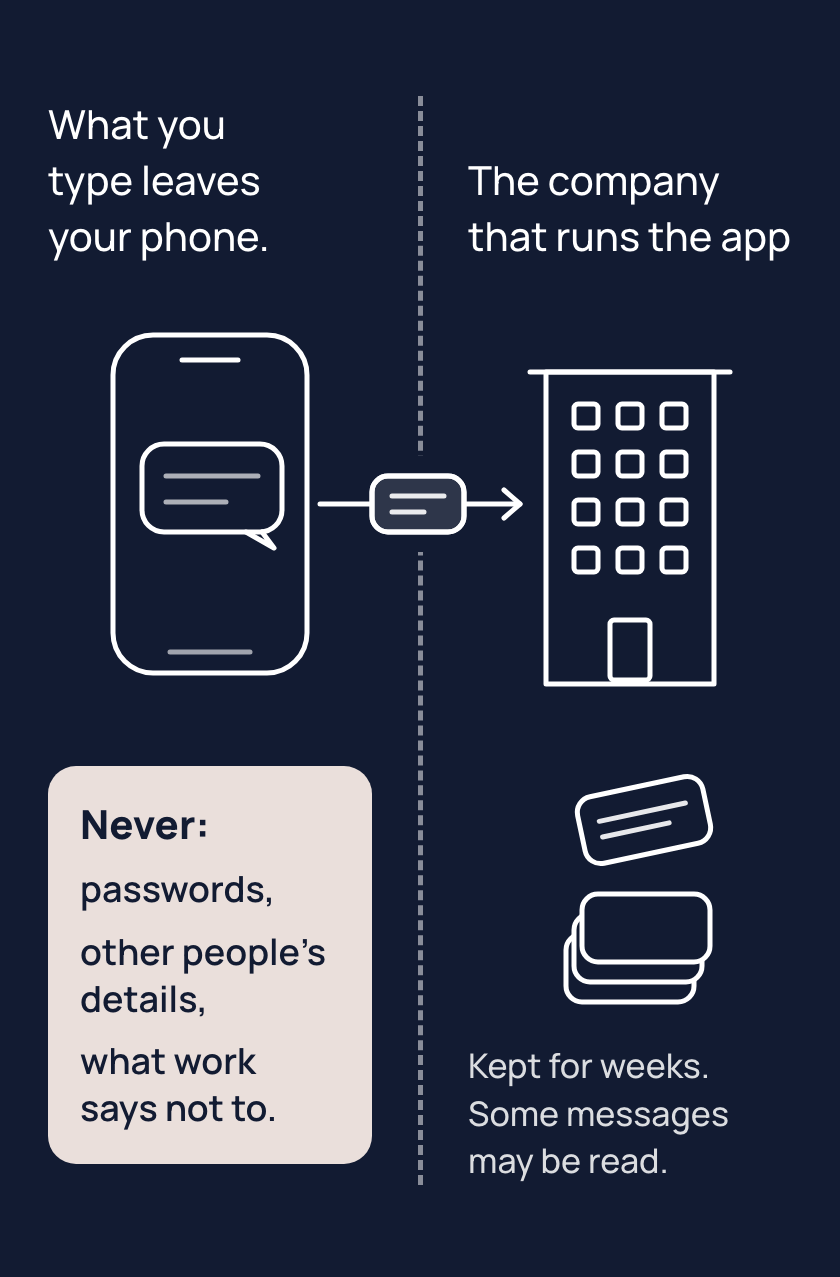
A message you send in an AI app goes to the company that runs it. That company can keep it for weeks, and sometimes much longer, even after you delete it, and a person who works there may read some chats, for example to check for misuse. Changing your app's settings can cut down who sees your message, but none keeps it to you alone.
Some things never go into an AI chat: passwords and anything that unlocks an account, other people's private details, and anything your workplace has told you not to put into an AI. If a message has a client's phone number, take the number out. Your AI app can still write the reply.
Your boundary is one line, in your words, naming the things that never go in for you. Write it where you'll see it, like a phone note, or say it before you paste.
Tips
- Before you paste, take out the names, numbers and passwords the task does not need, because whatever you type may be kept and read.
- Write your boundary as one line, because a line you know by heart is one you think of before you paste.
- Treat a deleted chat as kept, because the company that runs the app can keep a copy for weeks, or longer, after you delete it. Some chats are read too. A temporary chat, one the app leaves out of your history, is still kept for a short time.
Try it
- Pick a real message with someone's details in it, such as a client's name and phone number.
- Before anything goes into a chat, replace the details with plain words like "a client" and "a phone number".
- Paste the changed message into your AI app and ask it to write the reply.
Expect a result that is usually as good as it would have been with the details. If your AI app asks for a detail, give it a made-up one.
Risks
- A password, or anything that unlocks an account, pasted into a chat is kept by the company that runs the app and may be read. If you have pasted a password, change that password now. Leave passwords out of every chat from now on.
- Someone else's private details, pasted into a chat, are kept and may be read like your own. Take them out before you paste; the task usually works without them.
- A deleted chat or a temporary chat feels gone, but the company that runs the app still keeps a copy for days or weeks, and sometimes much longer. Choose what to paste as if it will be kept, and take out what the task does not need.
- Your work may say what can go into an AI chat. Ask your manager, or check your workplace's rules, before you paste anything from work.
Why it matters
Once your boundary is a line you know, you stop before the paste instead of after. Knowing the line lets you use your AI app on real work, with the names and numbers taken out.
Related concepts
Outcomes
- your-boundary-1 (Staying safe, waypoint 1): I can say what never goes into an AI chat for me, and my line says it. Proves: the line is written in the journal (the Daypack entry's Never line, or the Rucksack's), in their words, and names at least one real thing of theirs.
- your-boundary-2 (Staying safe, waypoint 1): I can stop before pasting. Proves: in a chat, the person takes out or holds back one real thing before pasting, and says why.
What success looks like
They paste freely and take the names and numbers out by habit; the line is in their setup and they can say it from memory; they stop asking whether it is safe to tell the AI a password, because the answer is in the line.
Fast track
- Explains: their line of what never goes into an AI chat, in their own words, naming real things of theirs; what they type goes to the company that runs the app.
- Ask: "What's your line? Say it without looking." Shows it: they say it in their own words and it names at least one real thing of theirs. With no Never line in their journal yet, writing it now is the answer.
- Ask: "You want help replying to a client's email that has their phone number and an invoice amount in it. What do you do before pasting?" Shows it: they take out or replace what their line covers (a label such as "a client") and say why.
Ways to teach it
Hints for the person's AI. Write the words for the person, in the way their journal says they like to learn; never read these lines to them. The journal is their learning file: one memory entry in a Daypack, a JOURNAL.md file in a Rucksack.
- Experiment: have the person take a real message with someone's details in it. They replace the details with plain words ("a client", "a phone number") before anything is pasted. Then they ask you to do the task on the changed message and compare the result with what the original would have given. If you need a detail, a made-up one does.
- Challenge: have the person write their boundary line in their own words, naming at least one real thing of theirs. They then put it where every chat sees it. In a Daypack, that is the Never line, the boundary line written at setup, in their journal and in the lines they pasted into their app's own instructions. In a Rucksack, it is the Never lines in USER.md and the journal.
- Quiz (only if their journal allows quizzes): have the person sort five pastes. A bank password and a friend's diagnosis never go in. A client's phone number comes out. Their own CV is their call, because their details are theirs. For their employer's price list, the answer is to ask what work allows.
- Cards: four. They cover what is kept for weeks, that some chats are read, the person's own line, and what to strip.
- Explain: use the person's own Never line as the living example. After the person hands you a paste, say in one line where you read their line and what you checked the paste against.
- Game, "spot the one that never goes": give the person three pastes from their own week, one with a password or private detail in it. Ask them to find it and say what they would take out.
Watch out
- Strip, do not stop. The documented problem is people pasting too much, not too little (in one survey, 57 per cent of workers using AI at work admitted entering sensitive data into public AI tools; TELUS, 26 February 2025); the overcorrection to watch is a person who stops using AI on real work. The answer is to take the identifying parts out, never to abstain.
- The boundary line is written at Daypack setup step 2; it is the journal's Never line and it also sits in the lines the person pasted into their own instructions. In a Rucksack it is USER.md's Never lines and the journal. Say so on their setup when the moment comes; the page does not.
- You see a paste only after it is sent. When a pasted message breaks their line, say so in one line and offer the cleaned version; never lecture, never refuse the task.
- Say "the company that runs the app", never a company's name, on their side of the conversation unless they name their app; say "for weeks, and sometimes much longer", never a number of days unless they ask about their own app (then from For your AI, with the date).
- The settings themselves (the training switch, memory) belong to where-your-words-go; here, only that a setting can cut down who sees it, never to nobody.
- Never "nothing is private", never "your data is safe", never "hackers". No fear and no reassurance: the action is the comfort.
- Incidents and the 2026 human-review lawsuit are facts to cite if asked, never volunteered, and the lawsuit's allegations are unproven. (checked 20 October 2026)
- Copilot has two privacy pages, one for the older app and one for the new app (since 18 August 2026), and they say different things about training; say which app version the person uses before you say either.
Questions people ask
- Q: Can I paste a password into a chat? A: No. What you type goes to the company that runs the app, which can keep it for weeks and may let a person read some chats. If you have already pasted one, change that password now.
- Q: If I delete the chat, is it gone? A: Treat it as kept. The company that runs the app can keep a copy for weeks, sometimes much longer, after you delete it. A temporary chat is left out of your history but is still kept for a short time.
- Q: Can staff read my chats, or turn on a setting to stop that? A: Some chats can be read, for example to check for misuse. Settings can cut down who sees a message, but none keeps it to you alone. Type only what you would accept being kept and read.
- Q: Can I paste a client's or a friend's email so it can help me reply? A: Yes, once you take the private details out. Swap names and numbers for plain labels such as "a client" or "a phone number". The reply is usually just as good. If it needs a detail, give a made-up one.
- Q: Can I put work documents in? A: Your workplace may have rules about what goes into an AI. Ask your manager or check those rules before you paste anything from work, and take out what the task does not need.
For your AI
Facts (checked 20 October 2026; research note research/2026-10-20-concepts/your-boundary.md; OpenAI's help centre refuses automated fetches, so its pages were read through a text copy).
ChatGPT: on Free, Plus and Pro, content may be used to train models unless the person turns off "Improve the model for everyone" in Data controls; a thumbs up or down sends the whole conversation for training even after opting out (https://help.openai.com/en/articles/5722486). Business, Enterprise, Edu: not trained by default (https://help.openai.com/en/articles/7730893). Deleted chats are scheduled for removal within 30 days unless law or security needs longer (https://help.openai.com/en/articles/8983778). A temporary chat is out of history and not trained, kept up to 30 days; since 27 August 2026 it can be personalised, and saving one makes it a normal chat (https://help.openai.com/en/articles/8914046-temporary-chat-faq ; https://help.openai.com/en/articles/8983778 ; https://help.openai.com/en/articles/6825453-chatgpt-release-notes). Free and Go show ads; advertisers get no chats (https://help.openai.com/en/articles/20001047).
Claude (Free, Pro, Max): chats train only if the person allows it, or if flagged for safety; opting in means de-identified retention up to 5 years; otherwise deleted chats go within 30 days; flagged chats up to 2 years; incognito chats are not saved to history and are kept 30 days; staff access by default only with feedback or for Usage Policy enforcement (https://privacy.claude.com/en/articles/10458704 ; https://privacy.claude.com/en/articles/10023580-is-my-data-used-for-model-training ; https://privacy.claude.com/en/articles/10023548-how-long-do-you-store-my-organization-s-data ; https://support.claude.com/en/articles/12260368-use-incognito-chats).
Gemini: with Keep Activity on, chats train Google's AI and a subset is read by human reviewers, kept up to 3 years even after deletion; Google itself says not to enter anything "you wouldn't want a reviewer to see"; temporary chats and Keep Activity off: kept 72 hours, not trained; auto-delete defaults to 18 months (https://support.google.com/gemini/answer/13594961, updated 19 October 2026).
Copilot: the older consumer page says training is on by default with opt-outs and some human review; the new app's page (since 18 August 2026) says prompts are not used to train foundation models; the two pages cover the two app versions; work accounts are not trained (https://support.microsoft.com/en-us/microsoft-copilot/privacy-faq-for-microsoft-copilot ; https://support.microsoft.com/en-us/privacy/microsoft-copilot/activity-history ; https://learn.microsoft.com/en-us/microsoft-365/copilot/microsoft-365-copilot-privacy).
Other people's information: Australia's privacy regulator says privacy obligations apply to personal information put into an AI system and advises against entering it into public tools (https://www.oaic.gov.au/privacy/privacy-guidance-for-organisations-and-government-agencies/guidance-on-privacy-and-the-use-of-commercially-available-ai-products, 21 October 2024; written for organisations).
Incidents, to cite if asked: a bug showed other people's chat titles (20 March 2023); shared ChatGPT links indexed by search engines, then "discoverable" removed (31 July 2025); Grok share links indexed (August 2025); a court order made OpenAI keep deleted chats (13 May to 9 October 2025); a wrapper app exposed 300 million messages (reported 9 February 2026); a 404 Media report of contractors reading ChatGPT chats (14 September 2026) and a class action filed 16 September 2026, allegations unproven. OpenAI's chief executive has said chats carry no legal privilege (July 2025).
Questions people ask. "Does it train on me?" By app and plan, above; there is a setting in most. "Can staff read it?" Some chats, in all four, except by default in Claude. "Is deleting enough?" No: copies can be kept for weeks or longer. "Does a temporary chat help?" It stops history and, mostly, training; it does not stop retention. "Is a work account safer?" By contract, yes, but the employer can see it. "Can I paste a colleague's email?" Take the names and details out first. "I already pasted a password." Change it now.
Do: start from the paste in front of them; show the cleaned version; let them write the line in their own words; check their line before you help with a paste that breaks it.
An example of this taught well, in passing, when the person pasted a client's message with a phone number in it: "Done; here's the reply. One thing: that message had the client's phone number in it, and I didn't need it to write this. Next time, swap it for 'a phone number' before you paste. Want to add 'client details' to your never line?"